EF Talk Scriber
What is EF Talk Scriber?
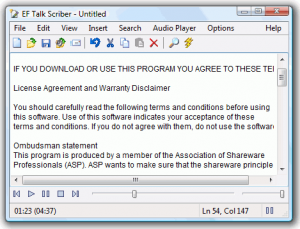
EF Talk Scriber is a specialized manual transcription software developed by EFSoftware that combines a feature-rich text editor with an integrated audio player to facilitate the process of transcribing spoken audio into written text. Unlike modern AI-powered automatic transcription services, EF Talk Scriber functions as a digital dictation transcribing machine where users manually type what they hear as the audio plays. The software is designed for transcriptionists, journalists, legal professionals, researchers, and anyone who needs to convert recorded speech into written documents. It supports common audio formats including WAV, MP3, Ogg Vorbis, and FLAC, while providing keyboard shortcuts and playback controls that keep transcribers’ hands on the keyboard for maximum efficiency. The application includes hot link functionality that connects specific text portions to corresponding audio timestamps for easy reference and verification.
Key Features
Integrated Audio Player: Play WAV, MP3, Ogg/Vorbis, and FLAC audio files directly within the application without switching between separate programs.
Full Text Editor: Access comprehensive word processing features including search, find and replace, word wrap, and document formatting for professional transcription output.
Hot Link Support: Create connections between text segments and specific audio timestamps, enabling quick navigation to relevant audio portions for verification.
Customizable Keyboard Shortcuts: Configure all playback and editing functions with custom hotkeys, allowing transcriptionists to control audio and text without leaving the keyboard.
Variable Playback Speed: Adjust audio playback speed to match typing proficiency, slowing down for difficult passages or speeding up for clear sections.
Unicode Character Support: Handle international characters and special symbols for transcribing content in multiple languages and technical contexts.
Multi-Language Interface: Choose from twelve interface languages including English, German, Arabic, Catalan, Chinese, French, Hebrew, Italian, Japanese, Korean, Romanian, and Spanish.
Insert Date and Time: Quickly add current date and time stamps into transcription documents for notation and reference purposes.
Portable Version: Run the software from USB drives without installation for transcription work on multiple computers.
What’s New in EF Talk Scriber
Version 25.10, released in 2025, includes updated compatibility with current Windows versions ensuring smooth operation on Windows 11. The audio playback engine has been refined for better performance with high-bitrate MP3 and FLAC files. Memory management improvements allow handling longer audio files without performance degradation. Bug fixes address occasional synchronization issues between hot links and audio timestamps when working with files over two hours in length. The interface includes minor visual refinements for better readability on high-resolution displays. Keyboard shortcut responsiveness has been improved for faster playback control during intensive transcription sessions. Unicode handling has been enhanced for better support of mixed-language transcriptions containing multiple character sets.
System Requirements
Operating System: Windows Vista, Windows 7, Windows 8, Windows 10, Windows 11 (32-bit or 64-bit)
Processor: Intel Pentium or compatible CPU
Memory: 512 MB RAM minimum (1 GB recommended)
Storage: 2 MB free hard drive space for installation
Audio: Sound card for audio playback
Display: 800×600 minimum screen resolution
Additional: Headphones or speakers recommended for clear audio monitoring
Download Guide
Visit the official EFSoftware website at www.efsoftware.com and navigate to the EF Talk Scriber product page. Select your preferred version: Windows 32-bit, Windows 64-bit, combined 32+64 bit installer, or portable edition for USB use. Download the 1.2 MB installation file appropriate for your system. Run the downloaded executable and follow the installation wizard prompts. The software is shareware, offering a trial period for evaluation before requiring license purchase. After installation, launch EF Talk Scriber and configure your preferred keyboard shortcuts through the settings menu. Load an audio file using the File menu or drag-and-drop, then begin transcription by typing as the audio plays. Use the playback controls and speed adjustment to optimize your transcription workflow.
EF Talk Scriber vs Alternatives
vs Otter.ai: Otter provides automatic AI transcription with speaker identification and cloud sync, but requires internet connectivity and subscriptions. EF Talk Scriber offers offline manual transcription with complete privacy and one-time purchase pricing.
vs Express Scribe: Express Scribe is a popular manual transcription tool with foot pedal support and more advanced playback features. EF Talk Scriber is lighter weight with a simpler interface and lower cost.
vs Dragon NaturallySpeaking: Dragon offers voice recognition for direct dictation, while EF Talk Scriber requires manual transcription of pre-recorded audio, serving different use cases entirely.
vs oTranscribe: oTranscribe is a free web-based manual transcription tool with basic features. EF Talk Scriber provides desktop functionality, hot links, and works offline with no file upload requirements.
Pros and Cons
Pros:
- Extremely lightweight at only 1.2 MB installation size
- Minimal system requirements run on virtually any PC
- Fully customizable keyboard shortcuts for efficient workflow
- Hot link functionality between text and audio timestamps
- Works completely offline without internet dependency
- Supports multiple audio formats including FLAC
- Portable version available for USB deployment
- Multi-language interface supports international users
- One-time purchase rather than subscription model
Cons:
- No automatic speech recognition or AI assistance
- Manual transcription is time-consuming compared to automated services
- Windows-only platform excludes Mac and Linux users
- Interface appears dated compared to modern applications
- Lacks cloud storage or collaboration features
- No foot pedal support for hands-free playback control
- Limited compared to specialized transcription software
- Shareware model requires purchase after trial period
Who Should Use EF Talk Scriber?
Professional transcriptionists working with sensitive audio requiring offline processing will appreciate the privacy and security of local-only operation. Court reporters and legal professionals transcribing depositions and hearings benefit from the hot link feature for easy audio reference during review. Journalists conducting interviews who prefer manual transcription for accuracy and context understanding can leverage the customizable shortcuts for efficient typing. Researchers analyzing recorded interviews and focus groups will find the timestamp linking valuable for qualitative analysis. Students transcribing lectures or research interviews on budget constraints gain affordable transcription capabilities without subscriptions. Medical transcriptionists handling confidential patient information appreciate the offline functionality ensuring HIPAA compliance. Anyone uncomfortable with cloud-based automatic transcription services maintaining audio privacy can use EF Talk Scriber for complete local control.
Frequently Asked Questions
Does EF Talk Scriber automatically transcribe audio?
No, this is a manual transcription tool. You listen to the audio and type the words yourself. It does not include automatic speech recognition technology.
Can I use a foot pedal for playback control?
EF Talk Scriber doesn’t have built-in foot pedal support. You’ll need to use keyboard shortcuts for playback control during transcription.
What audio formats are supported?
The software supports WAV, MP3, Ogg Vorbis, and FLAC audio file formats, covering the most common recording types.
Is it available for Mac or Linux?
No, EF Talk Scriber is exclusively for Windows operating systems (32-bit and 64-bit versions from Vista through Windows 11).
How much does it cost?
EF Talk Scriber is shareware with a trial period. Pricing information for the full license is available on the EFSoftware website.
Can I run it from a USB drive?
Yes, portable versions are available that run directly from USB drives without requiring installation on the host computer.
Final Verdict
EF Talk Scriber serves a specific niche for users who require or prefer manual transcription over automated AI services, particularly when privacy, accuracy verification, or offline operation are priorities. The software’s exceptional lightweight nature and minimal system requirements make it accessible on virtually any Windows computer, including older hardware unsuitable for resource-intensive modern applications. The hot link functionality between text and audio timestamps provides a useful verification feature absent from basic text editors, while customizable keyboard shortcuts optimize transcription efficiency for experienced typists. However, the lack of automatic speech recognition means transcription remains time-consuming manual work, a significant limitation in an era of increasingly capable AI transcription services. The dated interface and Windows-only platform further limit appeal. For professionals handling sensitive material requiring complete privacy, researchers needing precise timestamp references, or users working in offline environments, EF Talk Scriber represents a practical, affordable solution. Those seeking speed and convenience should explore modern automatic transcription alternatives instead.
Developer:
EF Talk Scriber
Download Options
Download EF Talk Scriber
Safe & Secure
Verified and scanned for viruses
Regular Updates
Always get the latest version
24/7 Support
Help available when you need it
Pros & Cons Analysis
Pros
- Real-time protection against malware and viruses
- Regular security updates and definitions
- User-friendly interface
- Low system resource usage
- Automatic scanning features
Cons
- May slow down system during full scans
- Occasional false positives
- Requires regular updates
- Some features may require premium version
System Requirements
- Windows 7 or later / macOS 10.12 or later
- 2 GB RAM minimum
- 500 MB available disk space
- Internet connection for updates