
AlternateStreamView – Complete Guide to NTFS Alternate Data Stream Viewer
What is AlternateStreamView?
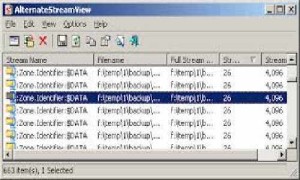
AlternateStreamView is a specialized utility developed by NirSoft that enables users to scan NTFS-formatted drives and discover hidden alternate data streams (ADS) that are typically invisible through Windows Explorer. This lightweight yet powerful tool provides comprehensive visibility into the hidden layer of file metadata that exists on modern Windows file systems, allowing users to view, extract, delete, and save alternate streams to separate files.
Alternate Data Streams represent a unique feature of the NTFS file system that allows multiple data streams to be associated with a single file. While the main data stream contains the visible file content, alternate streams can store additional metadata, file properties, or other information without being directly visible to users browsing through standard file management interfaces. This capability, while useful for legitimate purposes, can also be exploited by malware to hide malicious code or data.
One of the most common legitimate uses of alternate data streams involves web browsers marking downloaded files with the “Mark of the Web” designation. When you download a file from the internet, modern browsers create a Zone.Identifier alternate stream that contains information about the file’s origin and security zone. This mechanism helps Windows determine whether to display security warnings when opening potentially unsafe files. AlternateStreamView makes it easy to inspect these hidden markers and understand exactly what metadata is attached to your files.
The tool operates with minimal system resources and requires no installation, making it perfect for system administrators, security professionals, and advanced users who need to maintain visibility into all aspects of their file system. Whether you’re investigating potential security threats, cleaning up unnecessary metadata, or simply exploring the hidden features of NTFS, AlternateStreamView provides an essential window into this often-overlooked aspect of Windows file storage.
Key Features
AlternateStreamView delivers a comprehensive set of features designed specifically for managing and inspecting alternate data streams on NTFS volumes:
Complete Drive Scanning: The application can scan entire NTFS drives, specific folders, or individual files to detect all alternate data streams present in the selected scope. The scanning engine works quickly and efficiently, even on large volumes with thousands of files, providing detailed results that include stream names, sizes, and associated file paths.
Stream Extraction and Export: Users can extract alternate streams to standalone files, making it possible to examine their contents using appropriate applications. This feature proves invaluable when investigating suspicious streams or recovering data stored in alternate streams. The export functionality supports batch operations, allowing multiple streams to be extracted simultaneously.
Stream Deletion Capabilities: When unnecessary or malicious alternate streams are discovered, AlternateStreamView provides the ability to delete them individually or in bulk. This is particularly useful for removing “Mark of the Web” identifiers from trusted files or cleaning up metadata accumulated over time. The deletion process is straightforward and includes confirmation prompts to prevent accidental data loss.
Detailed Information Display: The interface presents comprehensive details about each discovered stream, including the stream name, size in bytes, the full path to the parent file, creation time, modification time, and the actual data contained within smaller streams. This wealth of information helps users make informed decisions about which streams to keep, extract, or remove.
Portable and Lightweight Design: As with most NirSoft utilities, AlternateStreamView requires no installation and can be run directly from any location, including USB drives. The entire application is contained in a single executable file that consumes minimal system resources, making it ideal for inclusion in portable security toolkits or system administrator utilities collections.
Zone.Identifier Detection: The tool specifically identifies and highlights Zone.Identifier streams created by web browsers, making it easy to see which files have been downloaded from the internet and what security zones they originated from. This feature assists in understanding and managing Windows security policies related to downloaded content.
What’s New
AlternateStreamView maintains NirSoft’s tradition of providing stable, reliable utilities with periodic updates that address compatibility issues and enhance functionality for modern Windows environments. Recent versions have focused on ensuring seamless operation with the latest Windows 10 and Windows 11 builds, particularly as Microsoft continues to evolve NTFS and introduce new security features.
The most recent updates have improved the scanning engine’s performance when working with solid-state drives (SSDs) and NVMe storage devices, which have different performance characteristics compared to traditional hard disk drives. These optimizations result in faster scan times and reduced system impact during operation, especially important when scanning large volumes with millions of files.
Enhanced compatibility with Windows Defender and other real-time antivirus solutions has been implemented to prevent false positive detections. Since AlternateStreamView accesses low-level file system features and can modify file metadata, some security software previously flagged it as potentially unwanted. The latest versions include behavior modifications that help security software recognize the tool as legitimate.
Support for long path names (paths exceeding the traditional 260-character Windows limit) has been added, ensuring that files stored in deeply nested directory structures can be scanned and their alternate streams managed. This addresses issues that arose as users increasingly organize files in complex folder hierarchies.
The user interface has received minor refinements to improve readability on high-DPI displays and 4K monitors, with better font scaling and column width adjustments. These changes ensure that the detailed stream information remains easily readable regardless of screen resolution or scaling settings.
System Requirements
AlternateStreamView is designed to operate with minimal system requirements, making it accessible to virtually any Windows user:
Operating System: Windows XP and later, including Windows Vista, 7, 8, 8.1, 10, and 11 (both 32-bit and 64-bit editions). The tool works on all Windows versions that support NTFS file systems, though its primary utility is on modern Windows installations where alternate data streams are commonly used.
File System: NTFS is absolutely required, as alternate data streams are an NTFS-specific feature. The utility will not find alternate streams on FAT32, exFAT, or other file systems that don’t support this functionality. Most modern Windows installations use NTFS by default, but users should verify their file system type if the tool returns no results.
Memory: Less than 10 MB of RAM is required for basic operation. Memory usage scales slightly with the number of discovered streams, but even when scanning drives with thousands of alternate streams, the application typically consumes less than 50 MB of memory.
Storage Space: The application executable is under 100 KB, requiring virtually no disk space. If extracting alternate streams to files, users should ensure adequate free space on the destination drive to accommodate the extracted data.
Processor: Any x86 or x64 processor from the past 15 years will run the application without difficulty. There are no special CPU requirements or instruction set dependencies.
Permissions: Administrative privileges may be required when scanning system-protected folders or attempting to delete alternate streams from files in protected locations. Running the application as a standard user allows scanning and viewing streams in accessible locations, but full functionality requires administrator access.
Download and Installation Guide
Obtaining and deploying AlternateStreamView is straightforward, following NirSoft’s philosophy of simple, portable utilities:
Download Source: The official and recommended download source is the NirSoft website at nirsoft.net. Navigate to the AlternateStreamView page and download either the 32-bit or 64-bit version depending on your Windows installation. While both versions work on 64-bit Windows, the 64-bit version may offer slightly better performance. The download is provided as a ZIP archive containing the executable and a readme file.
Extraction: After downloading, extract the ZIP archive to any location on your computer. Common choices include a dedicated folder in your user directory, a portable apps folder, or directly on a USB drive for portable use. No installation process is required—the application runs directly from the extracted executable file.
First Launch: Simply double-click the AlternateStreamView.exe file to launch the application. On first run, Windows may display a SmartScreen warning since the application is not commonly downloaded. Click “More info” and then “Run anyway” to proceed. This warning appears because the executable is not signed with an expensive commercial code-signing certificate, though the application itself is completely safe.
Antivirus Considerations: Some antivirus programs may flag AlternateStreamView as potentially unwanted due to its ability to access and modify file system metadata. If your security software quarantines the application, you’ll need to create an exception or whitelist the executable. This is a false positive—NirSoft utilities are well-established and trustworthy tools used by IT professionals worldwide.
Configuration: The application stores its settings in an .ini file created in the same folder as the executable. This makes the tool completely portable—you can copy the entire folder to another computer and retain all your settings. No registry entries are created, and no files are placed in Windows system folders.
AlternateStreamView vs Alternatives
When comparing AlternateStreamView to alternative tools for managing NTFS alternate data streams, several options exist with varying capabilities:
Microsoft Sysinternals Streams: This is the most direct alternative, developed by Microsoft as part of the renowned Sysinternals suite. Streams is a command-line utility that can scan directories and remove alternate data streams. While it’s official Microsoft software and integrates well with enterprise environments, it lacks the graphical interface that makes AlternateStreamView more accessible to non-technical users. Streams excels in scripting scenarios and automated workflows, but for interactive exploration and selective stream management, AlternateStreamView’s visual interface provides significant advantages. Both tools are free, so the choice primarily depends on whether you prefer command-line or GUI operation.
LADS (List Alternate Data Streams): Another command-line utility that focuses solely on listing alternate streams without providing deletion or extraction capabilities. LADS is extremely lightweight and fast but offers limited functionality compared to AlternateStreamView. It’s best suited for quick scans when you only need to verify the presence of alternate streams rather than manage them.
PowerShell Get-Item cmdlet: Modern PowerShell versions include built-in support for viewing alternate streams through the Get-Item cmdlet with the -Stream parameter. This approach requires no additional software but demands familiarity with PowerShell syntax and lacks the convenient overview that dedicated tools provide. For users already proficient in PowerShell scripting, this built-in capability can be sufficient for basic stream management tasks.
Alternate Stream Detector: A less well-known tool that provides functionality similar to AlternateStreamView but with a less polished interface and fewer update cycles. While it works adequately for basic tasks, the interface feels dated, and the tool hasn’t been updated as consistently as NirSoft’s offering.
AlternateStreamView strikes an excellent balance between ease of use and functionality, making it the preferred choice for most users who need regular interaction with alternate data streams. Its graphical interface, combined with comprehensive feature set and regular updates, positions it as the most user-friendly option in this category.
Pros and Cons
Pros:
- Completely Free: No cost, no trial periods, and no premium versions—the full functionality is available to all users without any restrictions or limitations.
- Portable Design: Requires no installation and can be run from any location, making it perfect for portable toolkits or quick diagnostic work on different systems.
- Intuitive Interface: Despite dealing with a technically complex subject, the application presents information in a clear, organized manner that even less experienced users can understand.
- Minimal Resource Usage: Extremely lightweight with negligible impact on system performance, even when scanning large volumes.
- Comprehensive Functionality: Provides not just viewing capabilities but also extraction, deletion, and saving of alternate streams, covering all common use cases.
- Regular Updates: NirSoft maintains consistent compatibility with new Windows versions, ensuring the tool remains functional as operating systems evolve.
- Safe Operation: Despite its power, the tool includes appropriate safeguards and confirmations to prevent accidental data loss.
Cons:
- Windows Only: As NTFS is a Windows file system, the tool naturally only works on Windows platforms, with no macOS or Linux versions available.
- No Scheduled Scanning: The application must be run manually; there’s no built-in scheduling feature for automated periodic scans of drives.
- Basic Reporting: While it displays comprehensive information, there are no advanced reporting features, export formats, or statistical analysis capabilities.
- Antivirus False Positives: Some security software may flag the tool due to its low-level file system access, requiring users to create exceptions.
- Limited Documentation: While the interface is intuitive, more extensive documentation about alternate data streams and their implications would benefit less technical users.
- No Cloud Storage Support: The tool only works with local or network-attached NTFS volumes and cannot scan cloud storage services.
Who Should Use AlternateStreamView?
AlternateStreamView serves several distinct user groups, each with different needs and use cases:
Security Professionals and Incident Responders: When investigating potential malware infections or security incidents, examining alternate data streams is a crucial forensic step. Malware sometimes hides code or data in alternate streams to evade detection by standard antivirus scans. Security analysts can use AlternateStreamView to quickly identify suspicious streams, extract them for analysis, and remove malicious content. The tool’s portable nature makes it ideal for inclusion in incident response toolkits that need to be deployed across multiple systems.
System Administrators: IT professionals managing Windows networks can utilize AlternateStreamView to understand and control the metadata attached to files across their infrastructure. This includes auditing which files have been downloaded from the internet (via Zone.Identifier streams), cleaning up unnecessary metadata that accumulates over time, and troubleshooting issues related to file security warnings. The ability to script operations using NirSoft’s command-line parameters makes it suitable for automated maintenance tasks.
Power Users and Windows Enthusiasts: Advanced Windows users who want to understand every aspect of their system will find AlternateStreamView enlightening. It reveals a hidden layer of the file system that most users never see, providing insight into how Windows manages file metadata and security markers. Power users can remove “Mark of the Web” flags from trusted files, recover data accidentally stored in alternate streams, or simply satisfy their curiosity about NTFS internals.
Forensic Analysts: Digital forensics professionals require comprehensive visibility into all data stored on NTFS volumes. Alternate streams can contain critical evidence or hide exculpatory information, making tools like AlternateStreamView essential for thorough investigations. The ability to extract streams without modifying parent files helps preserve evidence integrity while enabling analysis.
Software Developers: Developers working with the NTFS file system or creating applications that utilize alternate streams need testing and debugging tools. AlternateStreamView allows developers to verify that their applications correctly create, modify, or remove alternate streams, and to troubleshoot issues related to stream handling.
This tool is not particularly necessary for average users who simply browse the web and use standard applications, as Windows manages alternate streams transparently in normal operation. However, anyone dealing with downloaded files that trigger security warnings, investigating unusual file behavior, or working in technical roles will find AlternateStreamView invaluable.
Frequently Asked Questions
Are alternate data streams dangerous?
Alternate streams themselves are not inherently dangerous—they’re a legitimate NTFS feature used by Windows for various purposes. However, like any system feature, they can be exploited by malware to hide malicious code. The most common legitimate use is the Zone.Identifier stream that browsers create to mark downloaded files. Regular users don’t need to worry about alternate streams in normal operation, but security-conscious users and IT professionals should be aware of their existence and occasionally audit them.
Will deleting alternate streams harm my files?
Deleting alternate streams typically does not damage the main file data. The primary file content is stored in the default unnamed stream and remains intact when alternate streams are removed. However, deleting certain streams may remove useful metadata. For example, removing Zone.Identifier streams will cause Windows to stop showing security warnings for downloaded files, which might be undesirable for untrusted content. Always understand what a stream contains before deleting it.
Why doesn’t Windows Explorer show alternate streams?
Microsoft deliberately designed Windows Explorer to hide alternate streams from typical users to avoid confusion. Most alternate streams contain technical metadata that isn’t useful for regular file management tasks. Showing these streams would clutter the interface and potentially confuse users. Specialized tools like AlternateStreamView exist specifically for users who need to work with this normally-hidden data.
Can I create my own alternate streams?
Yes, you can create alternate streams using command-line tools or programming interfaces. For example, the command “echo test > file.txt:mystream” creates an alternate stream named “mystream” attached to file.txt. However, there are few practical reasons for regular users to create custom streams. This functionality is mainly used by applications that need to store metadata alongside files without modifying the main file content.
Do alternate streams get copied when I copy files?
This depends on the copy method. Windows Explorer and most file management tools preserve alternate streams when copying files on the same NTFS volume. However, copying files to non-NTFS file systems (like FAT32 or exFAT) will lose all alternate streams since those file systems don’t support them. Some older copy methods and tools also strip alternate streams. Always verify that important metadata is preserved if you’re transferring files between systems.
Is AlternateStreamView safe to use?
Yes, AlternateStreamView is completely safe. It’s developed by NirSoft, a well-respected creator of Windows utilities trusted by IT professionals worldwide. The tool only reads and displays file system information; it doesn’t modify anything unless you explicitly choose to delete or extract streams. Some antivirus programs may flag it due to its low-level file system access, but these are false positives. Always download from the official NirSoft website to ensure you have the genuine, unmodified version.
Final Verdict
Rating: 4.5/5
AlternateStreamView stands as the definitive graphical tool for managing NTFS alternate data streams, earning its position as an essential utility for security professionals, system administrators, and advanced Windows users. Its combination of comprehensive functionality, user-friendly interface, and zero cost makes it the clear choice for anyone who needs regular visibility into this hidden aspect of the Windows file system.
The tool excels in its core mission: making the invisible visible. While Windows deliberately hides alternate streams from most users, there are numerous legitimate scenarios where understanding and managing these streams becomes necessary. Whether you’re investigating potential security threats, troubleshooting file security warnings, performing digital forensics, or simply learning about NTFS internals, AlternateStreamView provides exactly the right level of functionality without overwhelming users with unnecessary complexity.
What particularly impresses is NirSoft’s continued maintenance of the tool despite its specialized nature and relatively small user base. Regular updates ensure compatibility with the latest Windows versions, and the consistent user interface shared across NirSoft’s utility collection means that users familiar with one NirSoft tool can quickly become productive with others.
The portable, installation-free design aligns perfectly with the tool’s typical use cases. Security professionals can include it in their incident response toolkits, system administrators can run it across multiple systems without deployment hassles, and power users can keep it on a USB drive for occasional use without cluttering their system with installed applications.
Minor limitations prevent a perfect score: the lack of scheduled scanning features, basic reporting capabilities, and occasional antivirus false positives represent areas where improvement would be welcome. More comprehensive documentation about alternate streams and their implications would also benefit less technical users who are encountering the concept for the first time.
However, these minor shortcomings barely diminish the tool’s value for its intended audience. AlternateStreamView does exactly what it promises to do, does it well, and does it for free. For anyone working with Windows file systems at a technical level, this tool deserves a permanent place in your utility collection. It’s a perfect example of specialized software done right: focused, efficient, and reliable.