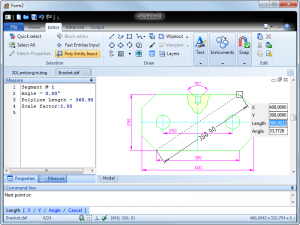
CADEditorX: ActiveX DWG/DXF, STP, PLT 11

1. Introduction
Software developers building applications requiring CAD functionality face the challenge of implementing complex drawing capabilities from scratch. CADEditorX provides an ActiveX control that embeds full-featured CAD editing capabilities directly into Windows applications, eliminating years of development effort. This component supports industry-standard formats including DWG, DXF, STP, and PLT, enabling developers to add professional CAD viewing and editing to custom software without mastering complex CAD file structures.
The control serves developers creating specialized engineering applications, document management systems, or industry-specific tools requiring CAD integration. Whether building property management software needing floor plan editing, manufacturing systems requiring technical drawing capabilities, or custom engineering tools, CADEditorX provides production-ready CAD functionality through simple ActiveX integration.
2. Key Features and Capabilities
Multi-Format Support: Reads and writes DWG, DXF, STP (STEP), PLT, and other CAD formats, ensuring compatibility with files from AutoCAD, SolidWorks, and other professional CAD systems.
Complete Editing Tools: Includes drawing primitives (lines, circles, arcs), advanced entities (polylines, splines, hatches), layer management, dimension tools, and text annotation capabilities matching professional CAD applications.
ActiveX Integration: Embeds seamlessly into Visual Basic, C++, C#, Delphi, and other development environments supporting ActiveX controls. Simple property and method interfaces enable rapid integration without steep learning curves.
Customizable Interface: Developers control toolbar visibility, available commands, and user interface elements, creating tailored CAD experiences matching specific application requirements rather than generic CAD interfaces.
Programming API: Comprehensive object model provides programmatic access to all drawing entities, enabling automation of repetitive tasks, custom command creation, and integration with application-specific business logic.
3. Technical Specifications
| Specification | Details |
|---|---|
| Supported OS | Windows 7/8/10/11, Server 2012+ |
| File Formats | DWG (2.5-2021), DXF, STP, PLT, SVG |
| Development Platforms | VB, C++, C#, Delphi, PowerBuilder |
| Deployment | Royalty-free runtime distribution |
4. Installation and Setup Process
Installation involves running the setup executable which registers the ActiveX control with Windows and installs documentation and sample projects. Developers then add the control to their development environment’s toolbox, enabling drag-and-drop placement onto forms like any standard control.
Initial integration requires minimal code—typically just a few lines to load CAD files and configure basic display properties. The comprehensive object model becomes relevant only when implementing custom functionality beyond standard CAD operations. Sample projects in multiple languages demonstrate common integration patterns and best practices.
5. User Interface and Workflow
From an end-user perspective, applications using CADEditorX present familiar CAD interfaces with standard drawing tools, zoom/pan controls, and layer management. The control handles all user interactions internally, requiring minimal event handling code from developers for basic CAD operations.
For developers, the workflow involves placing the control on forms, setting properties through the property window or code, and optionally handling events for custom functionality. The control manages the complexity of CAD rendering, file parsing, and user interaction, exposing simple interfaces for common operations while providing deep access for advanced customization.
6. Performance and Reliability
CADEditorX demonstrates good performance with typical engineering drawings. Files containing thousands of entities render smoothly on modern systems, with pan and zoom operations remaining responsive. Large assemblies or extremely complex drawings may experience slowdowns, though performance generally meets expectations for embedded CAD functionality.
Memory usage scales with drawing complexity, typically consuming 50-200MB for moderate-sized drawings. The control efficiently manages resources, releasing memory when files close. File loading speeds compare favorably to standalone CAD applications, with typical engineering drawings opening within 2-3 seconds.
The component demonstrates stability across extended use, properly handling malformed CAD files and edge cases without crashing host applications. Comprehensive error handling allows developers to gracefully manage file compatibility issues and user errors.
7. Comparison with Alternatives
| Feature | CADEditorX | Open Design Alliance | Custom Development |
|---|---|---|---|
| Integration Complexity | Simple (ActiveX) | Complex (SDK) | Very Complex |
| Editing Capabilities | Full Featured | Depends on Implementation | Depends on Effort |
| Development Time | Days to Weeks | Months | Years |
| Cost | $1,495 | $5,000+ annually | Developer salaries |
8. Practical Use Cases
Property Management Software: Developers add floor plan viewing and editing to rental management applications, enabling property managers to annotate spaces, measure areas, and maintain facility documentation within existing systems.
Manufacturing ERP Systems: Custom manufacturing software integrates technical drawing capabilities for work order management, allowing shop floor personnel to view parts drawings and add manufacturing notes directly within ERP interfaces.
Facilities Management Applications: Building management systems incorporate CAD viewing for maintenance planning, space allocation, and infrastructure documentation without requiring separate CAD software licenses.
Construction Project Management: Custom project management tools embed CAD editing for markup and collaboration, enabling field personnel to annotate drawings and communicate design clarifications without specialized CAD training.
9. Pricing and Value Proposition
CADEditorX uses perpetual licensing at $1,495 per developer seat. This includes unlimited royalty-free runtime distribution, meaning applications can be deployed to unlimited end-users without additional fees. Updates and support for one year are included, with annual renewal available for $395 to maintain access to new versions.
A fully functional trial version allows 30 days of development and testing without limitations. This evaluation period provides adequate time to integrate the control into projects and verify it meets technical requirements before purchase.
For developers, the cost compares extremely favorably to custom CAD functionality development requiring months or years of effort. Even modest hourly rates quickly exceed the component cost when considering the development time saved. The royalty-free distribution eliminates ongoing per-deployment costs that competitive solutions often impose.
10. Final Verdict
CADEditorX successfully delivers professional CAD capabilities through accessible ActiveX integration, dramatically reducing the complexity and timeline for adding CAD functionality to custom applications. The component excels through its comprehensive feature set and straightforward integration approach that makes advanced CAD capabilities accessible to developers without CAD domain expertise.
The wide format support ensures compatibility with industry-standard CAD files, while the customizable interface allows creating application-specific CAD experiences rather than generic embedded viewers. Performance proves adequate for typical use cases, though extremely large drawings may challenge the component.
We recommend CADEditorX for developers building custom applications requiring CAD viewing or editing capabilities, particularly those targeting specific industries or workflows where general-purpose CAD software proves too complex or expensive for end-users. The component’s royalty-free deployment model and reasonable pricing make it economically attractive compared to alternatives. The 30-day trial provides sufficient opportunity to validate technical compatibility and integration effort before purchase.
Developer:
CADEditorX: ActiveX DWG/DXF, STP, PLT 11
Download Options
Download CADEditorX: ActiveX DWG/DXF, STP, PLT 11
Download NowSafe & Secure
Verified and scanned for viruses
Regular Updates
Always get the latest version
24/7 Support
Help available when you need it
Pros & Cons Analysis
Pros
- ActiveX CAD viewing component
- DWG DXF support
- Developer integration
- Plotting capabilities
- STP file support
- Programmatic control
- Commercial component
Cons
- Windows developers only
- ActiveX technology dated
- Commercial license expensive
- Integration complexity
- Limited standalone use
- Niche development tool
System Requirements
- Windows 7 or later / macOS 10.12 or later
- 2 GB RAM minimum
- 500 MB available disk space
- Internet connection for updates