Elcomsoft eXplorer for WhatsApp

What is Elcomsoft eXplorer for WhatsApp?
Elcomsoft eXplorer for WhatsApp (EXWA) is a specialized forensic analysis tool developed by Elcomsoft Co. Ltd. for extracting, decrypting, and analyzing WhatsApp communication histories from both iOS and Android devices. This Windows-based application serves law enforcement agencies, digital forensics professionals, corporate investigators, and legal professionals who need to recover WhatsApp messages, call logs, media files, and contact information for investigative purposes. The software offers multiple acquisition methods including direct device extraction, cloud backup downloads from Google Drive and iCloud Drive, and local backup analysis. It handles encrypted WhatsApp databases and proprietary backup formats, automatically decrypting content for examination through its built-in viewer interface with advanced search and filtering capabilities.
Key Features
Multi-Source Acquisition: Extract WhatsApp data from Android phones (rooted and non-rooted), iOS system backups (local iTunes and iCloud), and proprietary WhatsApp cloud backups from Google Drive and iCloud Drive.
Direct Android Extraction: Acquire WhatsApp databases directly from rooted Android 4.0-9.0 devices and non-rooted Android 4.0-6.0.1 smartphones without requiring cloud backups.
Cloud Backup Support: Download and decrypt WhatsApp proprietary backups stored in Google Drive and iCloud Drive over-the-air without physical device access.
Automatic Decryption: Handle crypt14 and earlier encrypted backup formats, automatically decrypting WhatsApp databases for analysis (requires verification code access).
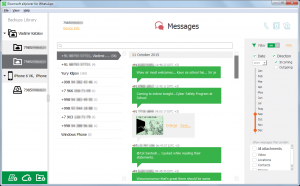
Built-in Viewer: Display extracted conversations, call history, shared media, and contact information in an intuitive interface resembling the WhatsApp application.
Advanced Search & Filter: Locate specific contacts, messages, or media using keyword searches with date range filtering for efficient investigation.
Multiple Database Viewing: Examine content from several WhatsApp accounts or devices simultaneously for comparative analysis.
Media Extraction: Recover photos, videos, audio files, and documents exchanged through WhatsApp conversations.
Export Capabilities: Generate reports and export extracted data for documentation and evidence presentation.
What’s New in Elcomsoft eXplorer for WhatsApp
Version 2.80.39025, released in December 2025, focuses on compatibility improvements and bug fixes. Authentication issues with WhatsApp backups stored in Google Accounts have been resolved, ensuring reliable cloud backup acquisition. Support for the latest WhatsApp versions has been added, including full compatibility with crypt14, the current encryption format for WhatsApp backups. Improved handling of large database files enhances performance when analyzing extensive communication histories. The Google Drive acquisition module has been updated to work with recent API changes. Bug fixes address edge cases in media file extraction and database parsing errors encountered with corrupted backups. Interface refinements improve navigation through lengthy conversation threads.
System Requirements
Operating System: Windows 10, Windows 8, Windows 7, or Windows Vista
Processor: 1 GHz or faster CPU
Memory: 512 MB RAM minimum (2 GB recommended for large databases)
Storage: 400 MB free hard drive space plus storage for extracted data
Internet Connection: Required for cloud backup acquisition and software updates
Additional Requirements: Apple ID credentials for iCloud backups, Google Account credentials for Google Drive backups, one-time access to target phone number for decryption key retrieval
Download Guide
Visit the official Elcomsoft website at www.elcomsoft.com and navigate to the eXplorer for WhatsApp product page. Click the Download button to save the 78.9 MB installation package to your computer. Run the installer executable and follow the setup wizard prompts to complete installation on your Windows system. The software is available as a trial version allowing evaluation of features before purchasing a full license for professional use. After installation, launch EXWA and select your acquisition method: direct device connection, cloud backup download, or local backup analysis. Follow the on-screen instructions specific to your chosen method. For cloud backups, provide necessary credentials and verification codes. The built-in help documentation guides you through each acquisition scenario and forensic workflow.
Elcomsoft eXplorer for WhatsApp vs Alternatives
vs Oxygen Forensic Detective: Oxygen offers comprehensive multi-app forensic extraction beyond just WhatsApp, but costs significantly more and requires extensive training compared to EXWA’s focused WhatsApp specialization.
vs Cellebrite UFED: Cellebrite provides enterprise-grade mobile forensics with broader device support and advanced physical extraction, but represents a much larger investment unsuitable for organizations needing only WhatsApp analysis.
vs Magnet AXIOM: AXIOM delivers complete digital forensics capabilities across multiple data sources, while EXWA offers dedicated WhatsApp expertise at a fraction of the cost for specialized investigations.
vs Dr.Fone WhatsApp Transfer: Dr.Fone focuses on consumer data transfer and backup recovery, lacking the forensic-grade decryption and analysis features required for investigative work that EXWA provides.
Pros and Cons
Pros:
- Specialized WhatsApp expertise with comprehensive extraction methods
- Supports both iOS and Android platforms
- Cloud backup acquisition without physical device access
- Handles latest crypt14 encryption format
- Intuitive viewer interface for non-technical users
- Advanced search and filtering capabilities
- Regular updates maintaining compatibility with WhatsApp changes
- More affordable than comprehensive forensic suites
Cons:
- Windows-only platform limits cross-platform workflows
- Requires one-time phone access for decryption keys
- Limited to WhatsApp data, no other messaging apps
- Cloud acquisition depends on credential availability
- Legal and ethical considerations for appropriate use
- Trial version has limitations on full functionality
- Not suitable for consumer data recovery purposes
Who Should Use Elcomsoft eXplorer for WhatsApp?
Law enforcement investigators examining WhatsApp communications during criminal investigations will benefit from the comprehensive extraction and decryption capabilities. Digital forensics professionals conducting mobile device examinations can leverage the tool for detailed WhatsApp analysis. Corporate security teams investigating internal misconduct or data breaches can recover relevant WhatsApp conversations. Legal professionals gathering electronic evidence for litigation can extract and document WhatsApp communications. Private investigators working on authorized cases benefit from the cloud acquisition features when physical device access is challenging. E-discovery specialists handling cases involving WhatsApp communications will appreciate the search and export functionalities. IT security researchers studying messaging app encryption can use it for legitimate security analysis. The tool is not intended for unauthorized surveillance or personal spying applications.
Frequently Asked Questions
Is this tool legal to use?
Yes, when used appropriately by authorized personnel for legitimate forensic investigations, legal proceedings, or with proper consent. Unauthorized surveillance or privacy violations are illegal.
Can I recover deleted WhatsApp messages?
Messages present in backups or device databases can be recovered. Permanently deleted messages with no backup copies cannot be retrieved.
Do I need the physical device?
Not always. Cloud backup acquisition allows extraction from Google Drive or iCloud without the phone, though you need account credentials and one-time verification access.
Does it work with WhatsApp Business?
The tool primarily targets standard WhatsApp. Compatibility with WhatsApp Business may vary depending on backup formats and database structures.
How much does it cost?
Pricing information is available on the Elcomsoft website. Professional forensic licenses typically require commercial purchase beyond the trial version.
Can it decrypt without the phone?
Decryption requires obtaining a verification code sent to the target phone number, so one-time access is necessary even for cloud backup acquisition.
Final Verdict
Elcomsoft eXplorer for WhatsApp delivers highly specialized and effective forensic analysis for WhatsApp communications, filling a crucial niche for investigators and legal professionals who need dedicated WhatsApp extraction capabilities. The software’s ability to acquire data from multiple sources including cloud backups without physical device access provides significant investigative flexibility. The built-in viewer and search capabilities make analysis accessible even for non-technical personnel, while the automatic decryption handles complex encryption formats transparently. Regular updates maintaining compatibility with WhatsApp’s evolving encryption and backup formats demonstrate Elcomsoft’s commitment to the forensic community. While the Windows-only platform and single-app focus limit versatility compared to comprehensive forensic suites, the specialized expertise and cost-effectiveness make it an excellent choice for organizations primarily concerned with WhatsApp investigations. When used ethically and legally, EXWA represents a powerful tool for legitimate forensic analysis of WhatsApp communications.
Developer:
distribution.
Download Options
Safe & Secure
Verified and scanned for viruses
Regular Updates
Always get the latest version
24/7 Support
Help available when you need it
Pros & Cons Analysis
Pros
- WhatsApp backup analysis
- Message extraction
- Media file recovery
- Forensic tool
- Multiple backup sources
- Contact extraction
- Call log analysis
Cons
- Windows-only software
- Forensic professional tool
- Legal use requirements
- Technical knowledge needed
- Expensive license
- Requires backup access
System Requirements
- Windows 7 or later / macOS 10.12 or later
- 2 GB RAM minimum
- 500 MB available disk space
- Internet connection for updates