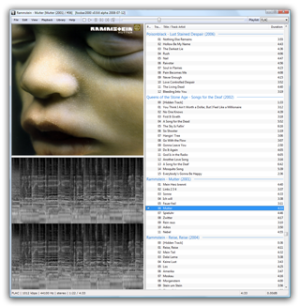
foobar2000 – Advanced Free Audio Player for Windows

What is foobar2000?
foobar2000 is a free, advanced audio player for Windows designed for audiophiles and power users who demand bit-perfect playback, extensive customization, and minimalist resource usage without the bloat and visual clutter of mainstream music players. Created in 2002 by Peter Pawlowski, a former Winamp developer, foobar2000 has become the reference standard among serious listeners and audio professionals who value sound quality, technical precision, and configurability over flashy interfaces and unnecessary features. With millions of users worldwide ranging from casual listeners to recording engineers, foobar2000 proves that powerful software doesn’t require complexity or cost.
foobar2000 excels at accurate audio reproduction with support for every conceivable format including MP3, AAC, Vorbis, Opus, FLAC, ALAC, APE, WavPack, Musepack, and dozens more through modular decoder architecture. The player delivers bit-perfect output through WASAPI, ASIO, and kernel streaming support that bypasses Windows audio processing for direct hardware access, ensuring pristine sound reproduction exactly as recorded. Advanced features include gapless playback essential for live albums and classical music, ReplayGain for intelligent volume normalization without dynamic range compression, extensive DSP capabilities for equalization and effects, andConverter component for transcoding between formats with surgical precision over quality settings.
Beyond pure playback, foobar2000 offers unprecedented customization through component architecture where users install only desired functionality—library management, tagging tools, lyrics display, visualization, device sync, or internet radio—creating perfectly tailored audio environments. The interface adapts completely through layout editing, color schemes, font choices, and component arrangement without requiring programming knowledge, while advanced users leverage scripting for automation and custom behaviors. For listeners who treat audio playback as craft rather than casual activity, foobar2000 provides professional-grade tools that respect intelligence without imposing unwanted features or artificial limitations.
Key Features
- Bit-Perfect Playback: WASAPI, ASIO, and kernel streaming support for unmodified audio reproduction bypassing Windows mixer.
- Universal Format Support: Native playback of MP3, AAC, Vorbis, FLAC, ALAC, APE, WavPack, Musepack, WMA, and more.
- Gapless Playback: Seamless transitions between tracks without silence for live albums and DJ mixes.
- ReplayGain Support: Intelligent volume normalization preserving dynamic range while equalizing loudness across tracks.
- Advanced Tagging: Comprehensive metadata editing with support for all common tag formats and custom fields.
- Component Architecture: Install only desired features through modular component system for minimal resource usage.
- DSP Effects: Built-in equalizer, crossfade, resampling, and expandable through third-party DSP components.
- Converter: Transcode between formats with detailed quality control and batch processing capabilities.
- Fully Customizable Interface: Rearrange panels, create custom layouts, and modify appearance completely without coding.
- Keyboard Shortcuts: Configure keyboard commands for every function enabling mouse-free control.
- Playlist Management: Advanced playlist features including search, sorting, and custom column configurations.
- Media Library: Optional library component organizes collections with faceted search and filtering.
- CD Ripping: Extract audio CDs with AccurateRip verification ensuring perfect copies.
- Low Resource Usage: Minimal CPU and memory footprint even with large libraries and high-resolution audio.
- Open Component SDK: Third-party developers create components extending functionality infinitely.
What’s New in foobar2000 2024/2025
- Enhanced WASAPI Support: Improved exclusive mode operation and better device compatibility.
- Updated Components: Core components updated for better stability and performance.
- Better High-DPI Scaling: Improved interface rendering on 4K and high-resolution displays.
- Performance Optimizations: Reduced memory usage and faster library scanning for large collections.
- Updated Decoders: Latest codec libraries for improved format compatibility and decode accuracy.
- Enhanced Converter: More encoding options and better batch processing for format conversion.
- Security Updates: Regular security patches addressing potential vulnerabilities in decoder libraries.
- Component Updates: Popular third-party components updated for modern Windows versions.
- Better Unicode Support: Improved handling of international characters in filenames and tags.
- Stability Improvements: Bug fixes and crash prevention in edge cases and complex configurations.
System Requirements
Windows
- Windows 7, 8, 8.1, 10, or Windows 11
- Intel Pentium 3 or equivalent (any modern processor sufficient)
- 256 MB RAM minimum (extremely lightweight)
- 10 MB available disk space for application
- Sound card supporting DirectSound, WASAPI, ASIO, or kernel streaming
- No additional dependencies or runtime requirements
Note About Other Platforms
- foobar2000 is Windows-only natively
- Official foobar2000 Mobile available for iOS and Android (separate app)
- Can run on macOS/Linux through Wine with varying success
- macOS alternatives: VOX, Swinsian, Audirvana
- Linux alternatives: DeaDBeeF, Audacious, Clementine
How to Get Started with foobar2000
- Download: Visit foobar2000.org and download the installer (standard or portable version available).
- Install: Run installer and follow prompts—installation completes in seconds with minimal options.
- Launch Application: Open foobar2000—default interface appears minimal with empty playlist.
- Add Music: Drag music files or folders onto playlist area or use File > Add Files/Folder.
- Start Playback: Double-click any track to begin playing—use toolbar buttons or keyboard shortcuts for control.
- Configure Output: File > Preferences > Playback > Output to select device and choose WASAPI for best quality.
- Install Components: Visit foobar2000 website Components page to download functionality like library management or lyrics.
- Add Components: Download .fb2k-component files and double-click to install, then restart foobar2000.
- Customize Layout: Right-click interface elements and select “Layout” or use View menu to arrange panels.
- Enable Library: Install Library component, then Library > Configure to add music folders for browsing.
- Configure Preferences: File > Preferences exposes extensive settings for playback, tagging, and behavior.
- Explore Components: Browse community components for additional features like visualizations, DSP effects, or device sync.
foobar2000 vs Alternatives
| Feature | foobar2000 | MusicBee | Winamp |
|---|---|---|---|
| Price | Free forever | Free | Free |
| Audio Quality | Bit-perfect, audiophile | Excellent | Good |
| Default Interface | Minimal, technical | Polished, user-friendly | Classic, nostalgic |
| Customization | Ultimate flexibility | Extensive | Good (skins) |
| Learning Curve | Steep | Easy | Easy |
| Best For | Audiophiles, power users | All-around excellence | Nostalgia, simplicity |
Pros and Cons
Pros
- Completely Free: No cost, ads, or premium tiers—professional tools forever free.
- Audiophile-Grade Quality: Bit-perfect playback with WASAPI/ASIO support satisfies demanding listeners.
- Extreme Customization: Configure every aspect of appearance and behavior to exact preferences.
- Minimal Resource Usage: Tiny memory footprint and CPU usage leaves resources for other applications.
- Modular Architecture: Install only needed components avoiding bloat from unused features.
- Active Community: Extensive component library and active forums provide endless functionality.
- Format Versatility: Plays virtually every audio format natively or through components.
- Professional Conversion: High-quality transcoding between formats with detailed control.
- Keyboard-Friendly: Comprehensive keyboard shortcuts enable efficient mouse-free operation.
- Stable and Mature: Two decades of development produce reliable, crash-free performance.
Cons
- Steep Learning Curve: Minimal default interface and extensive options overwhelm newcomers initially.
- Dated Appearance: Default interface looks outdated compared to modern media players.
- Configuration Required: Achieving desired functionality requires installing components and configuring settings.
- Windows Only: No official macOS or Linux versions limit platform flexibility.
- Limited Out-of-Box Features: Basic installation lacks library management, device sync, and many expect features.
- Component Dependency: Reliance on third-party components means occasional compatibility issues with updates.
Who Should Use foobar2000?
foobar2000 is ideal for:
- Audiophiles: Serious listeners demanding bit-perfect playback and maximum audio fidelity.
- Power Users: Those who enjoy deep customization and tailoring software to exact requirements.
- FLAC/Lossless Enthusiasts: Managing high-quality lossless collections requiring accurate playback.
- Minimalists: Users wanting lightweight player without visual clutter or unwanted features.
- Classical Music Listeners: Gapless playback essential for symphonies and continuous classical works.
- Format Converters: Transcoding between audio formats with professional-quality settings.
- Keyboard Shortcut Fans: Those preferring keyboard-driven interfaces over mouse clicking.
- Resource-Conscious Users: Running on older hardware or systems where every megabyte matters.
- Tinkerers: Enthusiasts who love exploring components and optimizing configurations.
- Audio Professionals: Recording engineers and producers needing accurate playback for reference monitoring.
Frequently Asked Questions
Why does foobar2000 look so basic compared to other players?
foobar2000’s minimalist default appearance reflects its philosophy prioritizing function over form—the player focuses CPU and memory on audio processing rather than flashy graphics. The basic look is entirely customizable through components and layout editing, allowing users to create anything from simple interfaces to elaborate designs matching personal preferences. Many users prefer the clean, distraction-free default that emphasizes music over eye candy, while others install UI components creating beautiful custom interfaces.
How is foobar2000 better for audio quality than other players?
foobar2000 supports WASAPI exclusive mode, ASIO, and kernel streaming which bypass Windows audio processing for direct hardware access, ensuring bit-perfect playback without resampling or quality degradation. The player processes audio with high internal precision, supports high-resolution formats up to 32-bit/384kHz, and offers gapless playback without artifacts. While differences are subtle with properly-configured alternatives, foobar2000’s focus on accuracy and technical excellence satisfies listeners with high-end audio equipment where quality differences become audible.
What components should I install for foobar2000?
Essential components for most users include: Library Tree or Album List for library browsing, Columns UI or Default UI customization for layout control, Playback Statistics for tracking play counts, and CD Ripper for extracting CDs. Popular optional components include Lyrics Show Panel for synchronized lyrics, Waveform Seekbar for visual seeking, foo_input_sacd for SACD ISO playback, and EsPlaylist for playlist enhancements. Start minimal and add components as needs arise rather than installing everything immediately.
Can foobar2000 sync music to my phone or iPod?
foobar2000 includes limited device sync capabilities through File Operations component, primarily for basic copying to USB mass storage devices. For comprehensive iPod/iPhone sync, install foo_dop component which provides iTunes-like synchronization. Android users can install official foobar2000 Mobile app and use UPnP streaming or manual file transfer. However, foobar2000’s sync capabilities remain less developed than MusicBee or iTunes—consider alternatives if device sync is primary requirement.
Final Verdict
foobar2000 stands as the audiophile’s choice among free music players through unwavering commitment to audio quality, customization freedom, and technical excellence without bloat or commercial compromise. The minimalist philosophy means beginners face steeper learning curves than polished alternatives like MusicBee, but users who invest time configuring foobar2000 to their preferences discover perfectly tailored audio environments impossible with opinionated, feature-locked players. For listeners treating music playback as craft requiring proper tools rather than casual background activity, foobar2000 delivers professional-grade capabilities that respect intelligence and reward exploration.
The Windows-only limitation and initial configuration requirements prevent universal recommendation, but for serious Windows-based listeners—audiophiles with high-end equipment, collectors maintaining lossless libraries, minimalists avoiding bloat, or power users demanding control—foobar2000 represents the gold standard that commercial players and casual alternatives cannot match. Download from foobar2000.org and discover why knowledgeable audio enthusiasts worldwide have made this unassuming player their permanent choice for critical listening and library management that prioritizes substance over style.
Developer:
Peter Pawlowski
Download Options
Download foobar2000 – Advanced Free Audio Player for Windows
Version 2.1.5
File Size: 5 MB
Download NowSafe & Secure
Verified and scanned for viruses
Regular Updates
Always get the latest version
24/7 Support
Help available when you need it
System Requirements
- Windows 7+, Windows 10, Windows 11