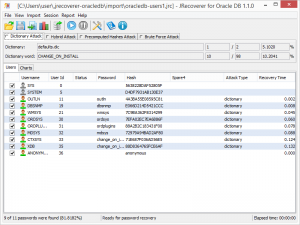
JRecoverer for Oracle Database Passwords

What is JRecoverer for Oracle Database Passwords
JRecoverer for Oracle Database Passwords is a specialized password auditing and recovery tool developed by LCPSoft for Oracle Database environments. Designed primarily for database administrators and security professionals, this cross-platform application helps audit password strength, recover lost or forgotten database user passwords, and identify security vulnerabilities in Oracle database user accounts.
The software employs multiple recovery techniques including dictionary attacks, brute force methods, hybrid approaches, and rainbow table lookups to test and recover passwords for Oracle Database user accounts. It’s particularly useful for organizations that need to regain access to critical database accounts when passwords are lost or for security teams conducting password strength audits to ensure compliance with organizational security policies.
Key Features
Cross-Platform Compatibility: Runs on Windows, Mac OS, and Linux operating systems, providing flexibility for diverse IT environments.
Multiple Import Methods: Import account information directly from Oracle databases using basic connections (SID or service name) or TNS network aliases. Also supports importing from text files for offline analysis.
Dictionary Attack Mode: Tests passwords against customizable word lists, including common passwords, leaked password databases, and industry-specific terminology that users often choose.
Brute Force Attack: Systematically tries all possible character combinations within specified parameters (length, character sets) to recover passwords through exhaustive search.
Hybrid Attack Methods: Combines dictionary and brute force approaches, applying variations like appending numbers or special characters to dictionary words—matching how users typically create passwords.
Rainbow Table Support: Uses precomputed hash tables for faster password recovery when dealing with standard Oracle password hashing algorithms.
Comprehensive Reporting: Generates detailed reports showing recovered passwords, account lists, recovery statistics, and charts analyzing password strength across your database environment.
Password Strength Metrics: Provides analysis of password complexity, identifying weak passwords that fail to meet security standards and pose risks to database security.
What’s New in the Latest Version
JRecoverer for Oracle Database Passwords version 1.4.0 represents the current release, incorporating improvements to the recovery engine and enhanced compatibility with recent Oracle Database versions. The update includes optimizations to the brute force algorithm that improve recovery speeds, particularly when dealing with complex passwords containing mixed character sets.
Recent versions have expanded rainbow table support, adding precomputed tables for additional Oracle password hash formats. The reporting module has been refined with more detailed metrics and improved visualization of password strength analysis across user accounts.
Compatibility updates ensure the software works seamlessly with Oracle Database 12c, 18c, 19c, and 21c, including support for newer security features and password hashing methods introduced in these versions.
System Requirements
Operating Systems:
- Windows 7/8/10/11 (32-bit or 64-bit)
- macOS 10.12 or later
- Linux (most major distributions)
Software Requirements:
- Oracle JRE (Java Runtime Environment) 9 or later—required for running the application
- Oracle Client libraries (for direct database connection)
Hardware Requirements:
- Minimum 2 GB RAM (4 GB+ recommended for brute force operations)
- 56 MB free disk space for installation
- Additional disk space for rainbow tables (varies by table size, can be several GB)
- Multi-core processor recommended for faster recovery operations
Network Requirements: Network connectivity to Oracle Database server if performing live database imports (not required for text file imports or offline analysis).
How to Download and Get Started
Step 1: Download
Visit the official LCPSoft website at lcpsoft.com and navigate to the JRecoverer for Oracle DB product page. Click the download link to get the installer package (approximately 56 MB). A trial version is available for evaluation before purchase.
Step 2: Install Java Runtime
Ensure Oracle JRE 9 or later is installed on your system. If not already present, download and install it from the Oracle website before proceeding with JRecoverer installation.
Step 3: Install JRecoverer
Run the downloaded installer and follow the setup wizard. Accept the license agreement, choose your installation directory, and complete the installation. The process takes 2-3 minutes.
Step 4: Launch Application
Open JRecoverer for Oracle Database Passwords. The interface will display options for importing account information and configuring recovery methods.
Step 5: Import Accounts
Choose your import method: connect directly to an Oracle Database by entering connection details (hostname, port, SID/service name, and credentials for a privileged account), or import account hashes from a text file if you’ve exported them separately.
Step 6: Select Recovery Method
Choose the appropriate recovery technique: dictionary attack for quick testing against common passwords, brute force for comprehensive but slower recovery, or rainbow tables for faster hash-based recovery if you have precomputed tables available.
Step 7: Configure Parameters
Set recovery parameters such as password length ranges, character sets to include, dictionary file locations, or rainbow table paths based on your selected method.
Step 8: Start Recovery Process
Click “Start” to begin password recovery. The software displays real-time progress, passwords found, and estimated time remaining. Complex passwords may take considerable time depending on the method and password complexity.
Step 9: Review Results
Once complete, review recovered passwords and generate reports showing password strength analysis, weak password identification, and compliance with security policies.
JRecoverer for Oracle vs Alternatives
JRecoverer vs Hashcat: Hashcat is a powerful open-source password recovery tool that supports Oracle hashes among hundreds of other hash types. It’s free and offers GPU acceleration for significantly faster recovery speeds. However, Hashcat requires command-line operation and technical expertise, while JRecoverer provides a graphical interface specifically designed for Oracle environments with database-specific import features. For Oracle-focused work with preference for GUI tools, JRecoverer is more approachable, though Hashcat offers better performance for power users.
JRecoverer vs John the Ripper: John the Ripper is another free, open-source password cracker supporting Oracle formats. Like Hashcat, it’s command-line based and requires technical knowledge. JRecoverer’s advantage lies in its specialized Oracle Database integration—direct connection and account import—versus John’s generic hash cracking approach that requires manual hash extraction.
JRecoverer vs Passware Kit: Passware Kit Forensic is an enterprise password recovery suite supporting numerous applications including Oracle. At $995+ for licenses, it’s significantly more expensive than JRecoverer’s $55-75 pricing, though it covers password recovery for dozens of applications beyond databases. For organizations needing only Oracle password auditing, JRecoverer provides better value.
JRecoverer vs Oracle Native Tools: Oracle provides password complexity verification functions and policies natively, but lacks password recovery capabilities. Organizations use JRecoverer to complement Oracle’s built-in security rather than replace it—testing whether existing passwords meet stated complexity requirements.
Pros and Cons
Pros:
Affordable Pricing: At $55 annually or $75 for perpetual license, it’s accessible for small IT departments and individual DBAs, unlike enterprise solutions costing hundreds or thousands of dollars.
Oracle-Specific Features: Direct database connection and account import streamline auditing workflows compared to generic password crackers requiring manual hash extraction.
Cross-Platform Support: Works identically on Windows, macOS, and Linux, matching the multi-platform nature of Oracle Database deployments.
Multiple Recovery Methods: Offers flexibility with dictionary, brute force, hybrid, and rainbow table approaches for different scenarios and time constraints.
Graphical Interface: User-friendly GUI makes it accessible to administrators who aren’t command-line experts, lowering the learning curve.
Cons:
Limited Free Version: Trial version shows only the first character of recovered passwords, severely limiting evaluation capabilities before purchase.
No GPU Acceleration: Relies on CPU processing, which is significantly slower than GPU-accelerated tools like Hashcat for brute force operations on complex passwords.
Oracle-Only Focus: Only works with Oracle Database, requiring additional tools if you need password auditing for MS SQL, MySQL, PostgreSQL, or other database platforms.
Java Dependency: Requires Oracle JRE installation and maintenance, adding complexity compared to standalone executables.
Recovery Speed: Brute force operations on strong passwords can take impractical amounts of time without the GPU acceleration offered by free alternatives.
Who Should Use JRecoverer for Oracle Database Passwords
Database Administrators: DBAs who’ve lost passwords to critical Oracle user accounts or need to audit password strength across database users to ensure compliance with security policies.
Security Auditors: IT security professionals conducting vulnerability assessments and password strength audits to identify weak credentials that could be exploited by attackers.
Compliance Officers: Organizations subject to regulations requiring regular password auditing (HIPAA, PCI-DSS, SOX) use tools like JRecoverer to verify password complexity requirements are actually enforced.
IT Departments: Small to medium-sized IT teams needing affordable password recovery capabilities for Oracle environments without the budget for enterprise security suites.
Consultants: Database consultants who occasionally need password recovery tools for client Oracle environments but don’t require daily use that would justify expensive licenses.
Frequently Asked Questions
Q: Is this tool legal to use?
A: Yes, when used appropriately. JRecoverer is designed for legitimate password recovery and security auditing of systems you own or have authorization to test. Unauthorized use against systems you don’t control is illegal.
Q: How long does password recovery take?
A: Recovery time varies dramatically based on password complexity and method. Dictionary attacks might succeed in minutes for weak passwords, while brute force on strong 10+ character passwords with mixed case, numbers, and symbols could take days or be impractical without GPU acceleration.
Q: Can it crack all Oracle passwords?
A: Given unlimited time and resources, most passwords can theoretically be recovered through brute force. Practically, very strong passwords (long, random, complex) may take so long that recovery is infeasible. The tool is most effective for auditing and recovering weak-to-moderate strength passwords.
Q: Does it work with Oracle Cloud databases?
A: Yes, if you can establish network connectivity to the Oracle Cloud database and have necessary credentials for accessing user account information, the tool can connect and import accounts similar to on-premises databases.
Q: What’s the difference between annual and perpetual licenses?
A: The $55 annual subscription includes all version updates and technical support for one year. The $75 perpetual license provides lifetime use of the current major version and its updates, but doesn’t include future major versions or extended support.
Final Verdict
JRecoverer for Oracle Database Passwords fills a specific niche: affordable, Oracle-focused password auditing for organizations that need specialized database password recovery capabilities without the cost and complexity of enterprise security suites. For its target audience—Oracle DBAs and small IT security teams—it delivers practical value through direct database integration and a user-friendly interface that free command-line alternatives lack.
The pricing is reasonable at $55-75, making it accessible for departments with limited budgets. The cross-platform compatibility matches Oracle’s multi-OS deployment reality, and the multiple recovery methods provide flexibility for different scenarios.
However, technical users comfortable with command-line tools may find better performance and value with free alternatives like Hashcat or John the Ripper, particularly for brute force operations where GPU acceleration provides dramatic speed advantages. The limited trial version makes pre-purchase evaluation difficult, and the Oracle-only focus means multi-platform database environments need additional tools.
For organizations primarily running Oracle databases who prefer graphical tools and need occasional password recovery or regular compliance auditing, JRecoverer represents a solid, affordable choice. For high-frequency password cracking or environments needing multi-database support, enterprise suites or free GPU-accelerated tools may be more appropriate.
Rating: 3.5/5 Stars – Competent specialized tool serving a narrow audience, offering good value for Oracle-focused shops but outperformed by free alternatives in raw capability.
Developer:
distribution.
Download Options
Safe & Secure
Verified and scanned for viruses
Regular Updates
Always get the latest version
24/7 Support
Help available when you need it
Pros & Cons Analysis
Pros
- Recovers Oracle database passwords
- Supports various Oracle versions
- Decrypts stored credentials
- Useful for database administrators
- Audit tool for security testing
- Works with password hashes
- Technical recovery tool
Cons
- Requires legitimate use authorization
- Complex tool for technical users only
- Windows-only application
- Limited to Oracle databases
- Could be misused
- Paid professional tool
System Requirements
- Windows 10 or later / macOS 10.15+
- 4 GB RAM recommended
- 350 MB available disk space
- Internet connection required