NXPowerLite Desktop

What is NXPowerLite Desktop
NXPowerLite Desktop is a specialized file compression software developed by Neuxpower that reduces the size of PDF, Microsoft Office, and image files without changing their format or quality. Unlike traditional compression tools like WinZip or 7-Zip that create archived files requiring decompression, NXPowerLite optimizes files directly—meaning compressed files remain in their original format and can be opened normally without any special software.
The software works by removing unnecessary data, optimizing images, and applying intelligent compression algorithms to PowerPoint, Word, Excel, PDF, JPEG, PNG, and TIFF files. This makes it ideal for businesses and professionals who regularly share large documents via email, cloud storage, or file transfer services. Files compressed with NXPowerLite maintain full compatibility with all standard applications while occupying significantly less storage space.
Key Features of NXPowerLite Desktop
Direct File Optimization: Compresses files in-place without creating archives. Your PDF remains a PDF, your PowerPoint stays a PowerPoint—no extraction needed to open compressed files.
Multi-Format Support: Handles PDF, PowerPoint (.ppt, .pptx), Word (.doc, .docx), Excel (.xls, .xlsx), JPEG, PNG, and TIFF files all from a single interface.
Batch Processing: Compress entire folders containing hundreds or thousands of files simultaneously. Drag and drop multiple files or folders for automated processing.
Quality Control: Choose from multiple optimization profiles (Screen, Print, Mobile) to balance file size reduction against visual quality based on your intended use.
Email Integration: Integrates directly with Microsoft Outlook to automatically compress attachments before sending, ensuring emails stay under size limits.
Backup Options: Automatically creates backup copies of original files before compression, providing safety against any unexpected issues.
Scheduled Compression: Set up automated tasks to compress files in specific folders on a schedule, ideal for maintaining organized network drives or cloud storage folders.
What’s New in the Latest Version
NXPowerLite Desktop version 10.3.1, released on November 6, 2024, brings several improvements to the compression engine and user experience. The update includes enhanced compression algorithms that achieve better file size reductions while maintaining visual quality, particularly for PDF files containing complex graphics and images.
Recent versions have improved compatibility with the latest Microsoft Office formats and added better support for modern PDF standards. The software now handles password-protected Office documents more reliably and includes updated image optimization routines that work more effectively with high-resolution photographs and graphics.
Performance enhancements in version 10.x have reduced processing time for large files and batch operations. Users working with folders containing hundreds of files will notice significantly faster completion times compared to previous versions.
System Requirements for NXPowerLite Desktop
Windows:
- Windows 7 SP1, Windows 8, Windows 10, Windows 11, or Windows Server editions
- Minimum 4 GB RAM (8 GB recommended for processing large files)
- 350 MB free disk space for installation
- .NET Framework 4.7.2 or later (installer will prompt if not present)
macOS:
- macOS 10.13 (High Sierra) or later, including Big Sur, Monterey, Ventura, and Sonoma
- Version 8.0.8 or later required for macOS Big Sur and newer (earlier versions are 32-bit only)
- 4 GB RAM minimum
- 350 MB free disk space
Additional Requirements: Microsoft Office installation is not required to compress Office files. However, to compress password-protected Office documents, the corresponding Office application must be installed on the system.
How to Download and Get Started with NXPowerLite Desktop
Step 1: Download
Visit neuxpower.com and navigate to the NXPowerLite Desktop product page. Click “Download” to get the installer for Windows or Mac. The download is approximately 50-60 MB and includes a 14-day free trial with full functionality.
Step 2: Install
Run the downloaded installer and follow the setup wizard. Accept the license agreement, choose your installation directory, and complete the installation. The process takes 2-3 minutes.
Step 3: Launch and Configure
Open NXPowerLite Desktop. The first launch will display the trial status and licensing options. You can use the full-featured trial for 14 days before deciding whether to purchase.
Step 4: Select Files
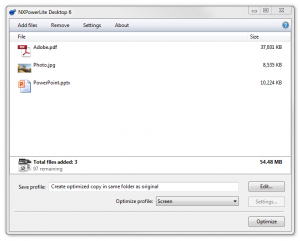
Drag and drop files directly onto the NXPowerLite window, or click “Add Files” to browse for documents. You can also add entire folders for batch processing.
Step 5: Choose Profile
Select an optimization profile: Screen (maximum compression), Print (balanced), or Mobile (optimized for mobile devices). The software displays estimated file size reduction for the selected profile.
Step 6: Compress
Click “Optimize” to start compression. NXPowerLite processes files and displays progress. Depending on file count and size, processing takes seconds to minutes.
Step 7: Review Results
After completion, review the compression report showing original size, new size, and percentage reduction for each file. Compressed files are saved in the location you specified, with originals optionally backed up.
NXPowerLite Desktop vs Alternatives
NXPowerLite vs WinZip/7-Zip: Traditional compression tools create archived .zip or .7z files that recipients must extract before use. NXPowerLite optimizes files in their native format—no extraction needed. This makes it superior for email attachments and document sharing where you want recipients to open files immediately. However, for long-term archival storage, traditional compression tools may achieve slightly better overall compression ratios.
NXPowerLite vs Adobe Acrobat Pro: Adobe Acrobat Pro includes PDF optimization features, but at $19.99/month for a subscription, it’s significantly more expensive than NXPowerLite’s one-time purchase model. NXPowerLite also handles Office files and images that Acrobat doesn’t process. However, Acrobat offers extensive PDF editing capabilities beyond just compression that NXPowerLite lacks.
NXPowerLite vs Online Compression Services: Free online services like Smallpdf or iLovePDF compress files through web browsers. While convenient for occasional use, they pose security risks for sensitive documents, have file size limits, require internet connectivity, and lack batch processing capabilities. NXPowerLite processes everything locally with no file uploads, making it more secure and practical for business use.
NXPowerLite vs Built-in Office Compression: Microsoft Office includes “Compress Pictures” features, but these require manually opening each document and applying compression individually. NXPowerLite automates the process across hundreds of files simultaneously and achieves better compression results through more sophisticated algorithms.
Pros and Cons of NXPowerLite Desktop
Pros:
Format Preservation: Files remain in their original format after compression—no archives to extract, no special software needed to open compressed files.
Significant Size Reduction: Typical compression results: 50-75% smaller for Office files, 30-60% for PDFs. Some heavily image-laden PowerPoint presentations shrink by 90% or more.
Perpetual Licensing: One-time purchase provides lifetime use of that major version with no recurring subscription fees. Much more economical than subscription-based alternatives for long-term use.
Batch Processing Power: Compress entire folders containing thousands of files overnight with scheduled tasks. Massive time-saver compared to manual compression.
Email Integration: Outlook plugin automatically compresses attachments, preventing “file too large” errors and improving email deliverability.
Cons:
Limited to Specific File Types: Only works with Office documents, PDFs, and common image formats. Cannot compress video files, CAD drawings, or other specialized formats.
No File Editing Features: Purely a compression tool. Unlike Adobe Acrobat or Office applications, it doesn’t provide any document editing, annotation, or content modification capabilities.
Learning Curve for Advanced Features: While basic compression is straightforward, configuring scheduled tasks, custom profiles, and automation requires time to master.
Price for Single Users: At approximately $50-90 per license depending on promotions, it may seem expensive for occasional personal use, though businesses find the ROI quickly through bandwidth and storage savings.
Who Should Use NXPowerLite Desktop
Business Professionals: Anyone regularly emailing large presentations, reports, or proposals will benefit from automatic compression that keeps attachments under email size limits while maintaining full quality.
Marketing and Sales Teams: Teams sharing large branded materials, brochures, and presentations with clients need files that are both small enough to email and maintain professional quality—NXPowerLite’s sweet spot.
IT Departments: IT teams managing network storage and backups can implement scheduled compression tasks to reduce storage consumption across file servers and cloud storage subscriptions.
Educational Institutions: Schools and universities distributing course materials, presentations, and PDF documents to large student populations benefit from reduced bandwidth costs and faster downloads.
Small Businesses: Companies without dedicated IT staff appreciate the set-it-and-forget-it nature of automated folder compression, reducing cloud storage costs without manual intervention.
Remote Teams: Distributed teams working with limited bandwidth or expensive mobile data connections benefit from smaller file sizes that transfer faster and consume less data.
Frequently Asked Questions (FAQ)
Q: Will compressed files look different or lose quality?
A: When using appropriate compression profiles, visual quality remains virtually identical to the original. The software removes unnecessary metadata and optimizes images using smart algorithms that preserve what the human eye can perceive while eliminating redundant data.
Q: Can recipients who don’t have NXPowerLite open compressed files?
A: Yes, absolutely. Compressed files remain in their original format (PDF, DOCX, PPTX, etc.) and open normally in standard applications like Adobe Reader, Microsoft Office, or any compatible software.
Q: How many computers can I install my license on?
A: NXPowerLite licenses are per user, not per computer. A single license allows installation on up to 3 machines as long as you are the only user of the software.
Q: Does the software require an internet connection to work?
A: No. After installation and activation, NXPowerLite works completely offline. All compression happens locally on your computer with no file uploads to cloud servers.
Q: What happens to the original files after compression?
A: You can choose to replace originals with compressed versions or save compressed files to a different location while keeping originals intact. The software also offers automatic backup options for safety.
Q: How much disk space will I save?
A: Results vary by file type and content. Typical reductions: Office documents with images (50-75%), PDF files (30-60%), image-heavy PowerPoints (70-90%). Text-only documents show minimal reduction since text is already efficiently stored.
Final Verdict
NXPowerLite Desktop excels as a specialized solution for a specific but widespread problem: reducing file sizes for PDFs, Office documents, and images without changing their format. For businesses and professionals who regularly battle email attachment size limits or manage growing cloud storage costs, this software delivers immediate, measurable value through automated compression that “just works.”
The perpetual licensing model makes it economically attractive compared to subscription-based alternatives, especially for long-term use. The ability to compress files while maintaining their original format—no archives, no extraction hassles—provides a genuinely better user experience than traditional compression tools for document sharing workflows.
However, NXPowerLite serves a narrow purpose. If you need compression for video files, database files, or other specialized formats, you’ll need different tools. If you rarely share large files or work primarily with text documents, the free compression features built into Office applications may suffice. And if you need document editing capabilities alongside compression, Adobe Acrobat Pro’s broader feature set might justify its higher subscription cost.
For its target audience—businesses, teams, and professionals who regularly work with large Office documents and PDFs—NXPowerLite Desktop is an excellent investment that pays for itself quickly through time savings, reduced storage costs, and eliminated email delivery headaches. The 14-day trial provides ample opportunity to test whether it fits your workflow.
Rating: 4/5 Stars – Highly effective specialized tool that solves a common business problem efficiently, though limited to specific file types.
Developer:
NXPowerLite Desktop
Download Options
Download NXPowerLite Desktop
Download NowSafe & Secure
Verified and scanned for viruses
Regular Updates
Always get the latest version
24/7 Support
Help available when you need it
Pros & Cons Analysis
Pros
- Compresses Office documents
- Reduces PDF size
- Email attachment optimization
- Batch processing
- Preserves quality
- Simple interface
- Significant size reduction
Cons
- Windows and Mac
- Paid software
- Limited free trial
- Some formatting changes possible
- Per-seat licensing
- Compression limits vary
System Requirements
- Windows 7 or later / macOS 10.12 or later
- 2 GB RAM minimum
- 500 MB available disk space
- Internet connection for updates