Pop3Connector

1. Introduction
Modern businesses often use multiple email accounts across different providers, creating management challenges when trying to centralize communications. Pop3Connector solves this problem by retrieving email from multiple POP3 accounts and delivering them to Microsoft Exchange Server, enabling centralized email management. Whether consolidating personal email into corporate systems, managing customer support addresses, or centralizing departmental accounts, this software streamlines multi-account email operations.
The application serves IT administrators managing Exchange servers, businesses consolidating external accounts, and organizations requiring centralized email management without changing existing address structures.
2. Key Features
Multiple Account Support: Retrieves email from unlimited POP3 accounts simultaneously, consolidating disparate email sources into Exchange Server for unified management.
Scheduled Retrieval: Configures automatic email checking at specified intervals, ensuring timely delivery without manual intervention.
Spam Filtering Integration: Works with Exchange anti-spam features, allowing centralized spam management across all retrieved accounts.
Distribution Rules: Routes retrieved emails to specific Exchange mailboxes based on recipient addresses, automating email distribution to appropriate users.
3. Technical Specifications
| Specification | Details |
|---|---|
| Exchange Versions | Exchange 2010/2013/2016/2019 |
| Protocol Support | POP3, POP3S (SSL/TLS) |
| Account Limit | Unlimited |
4. Installation and Setup
Installation on Exchange Server completes through standard MSI installer. Configuration involves adding POP3 account credentials, setting retrieval schedules, and defining distribution rules for routing emails to appropriate mailboxes.
5. User Interface and Workflow
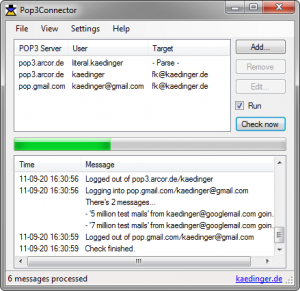
The management interface provides account configuration, monitoring, and logging. Administrators add accounts, configure settings, and monitor retrieval status through clear dashboards showing last check times and message counts.
6. Performance and Reliability
Pop3Connector operates efficiently as an Exchange service, checking accounts on schedule without administrator intervention. The software handles large mailboxes reliably and processes attachments without issues.
7. Comparison with Alternatives
| Feature | Pop3Connector | Manual Forwarding |
|---|---|---|
| Automation | Full | Manual Setup |
| Centralized Management | Yes | No |
8. Practical Use Cases
Customer Support: Businesses consolidate support@, info@, and sales@ addresses from external providers into Exchange for unified ticket management.
Multi-Domain Management: Organizations managing multiple domain names retrieve email from all domains into single Exchange environment.
9. Pricing and Value Proposition
Pop3Connector starts at $249 for basic licenses, with pricing scaling based on account count. The one-time purchase model provides value for organizations needing permanent email consolidation solutions.
10. Final Verdict
Pop3Connector successfully solves multi-account email management for Exchange environments through reliable automated retrieval and flexible routing capabilities.
We recommend Pop3Connector for organizations using Exchange Server needing to consolidate external POP3 accounts, particularly those managing customer service addresses or multi-domain email. The automated retrieval and centralized management justify the cost for businesses requiring professional email consolidation.
Developer:
Pop3Connector
Download Options
Download Pop3Connector
Download NowSafe & Secure
Verified and scanned for viruses
Regular Updates
Always get the latest version
24/7 Support
Help available when you need it
Pros & Cons Analysis
Pros
- Retrieves email from POP3
- Integrates with Exchange
- Scheduled downloads
- Multiple account support
- Filtering options
- IT administration tool
- Reliable retrieval
Cons
- Windows Server focused
- Technical setup required
- Niche IT use
- Commercial license
- Exchange specific
- Complex configuration
System Requirements
- Windows 7 or later / macOS 10.12 or later
- 2 GB RAM minimum
- 500 MB available disk space
- Internet connection for updates