Archive for the ‘Linux’ Category
Thursday, July 3rd, 2008 |
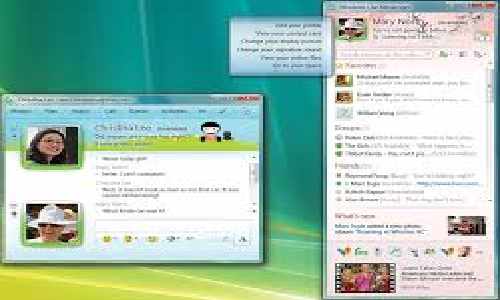
aMSN is a free open source MSN Messenger clone, with features such as:
:: Display pictures
:: Custom emoticons
:: Multi-language support (around 40 languages currently supported)
:: Webcam support
:: Sign in to more than one account at once
:: Full-speed File transfers
:: Group support
:: Normal, and animated emoticons with sounds
:: Chat logs
:: Timestamping
:: Event alarms
:: Conferencing support
:: Tabbed chat windows
aMSN is full of features, but you can extend its functionality even more now, getting extra features by installing Plugins, or completely change it’s look with different Skins.
Download: aMSN 0.97.1 Windows 95/98/NT/2000/XP, Linux, OS X, FreeBSD
Posted in Linux, Mac OS X, instant messaging | No Comments »
Thursday, July 3rd, 2008 |
OpenOffice.org is a multi-platform office productivity suite. It includes the key desktop applications, such as a word processor, spreadsheet, presentation manager, and drawing program, with a user interface and feature set similar to other office suites. Sophisticated and flexible, OpenOffice.org also works transparently with a variety of file formats, including those of Microsoft Office, and the vendor-neutral OpenDocument standard from OASIS.
Available in over 65 supported languages with more being constantly added by the community, OpenOffice.org runs stably and natively on Solaris, Linux (including PPC Linux), Windows, Mac OS X (X11), and numerous other platforms. Our porting page lists the platforms (ports) that OpenOffice.org can run on.
Written in C++ and with documented APIs licensed under the LGPL open-source license, OpenOffice.org allows any knowledgeable developer to benefit from the source. And, because the native file format for OpenOffice.org is the vendor-independent OpenDocument open standard, interoperability is easy, making future development and adoption more certain.
Download: OpenOffice.org 3.0.0 Beta 2 RC1
Posted in Betas, Linux, Mac OS X, Office | No Comments »
Wednesday, July 2nd, 2008 |
Adobe Reader is free software that allows everyone from business professionals to home users to easily and reliably view, print, and search PDF files using a variety of platforms and devices.
With Adobe Reader 8 software securely view, print, search, sign, verify, and collaborate on PDF documents, online as well as offline, from your home or office.
Operating system: Windows, Macintosh, Linux, Solaris, Pocket PC, Palm OS.
Download: Adobe Reader 9
Posted in Linux, Mac OS X, PDF Tools, Pocket PC/PDA | No Comments »
Wednesday, July 2nd, 2008 |
Opera 9.5 - Speed, security, and performance matter.
Discover the new standard in Web browsing. Download Opera today to get the fastest and most powerful Web browser available and make the most of your time online.
Opera is the Web pioneer that delivered tabbed browsing in 2000, and Opera 9.5 adds Full Text History Search allowing you to access find pages you forgot to bookmark by simply typing just a few words into your toolbar! Opera also gives you the ability to Create Search shortcuts from any search field on the Web; and to Synchronize your Bookmarks, Speed Dial with any other Mac or PC computer, your cell phone, or the Opera-powered game consoles through My Opera.
Whether you’re going to work, working from home, developing Web sites, or just looking for a quick, solid browser that can help you quickly access the Internet, the free Opera Web browser delivers a superior Internet experience for every aspect of your online life, with lots of extra tech tools for power users!
Download: Opera 9.51 Windows, Mac OS and Linux, BSD, Solaris…
Posted in Browsers, Linux, Mac OS X | No Comments »
Wednesday, July 2nd, 2008 |
Pando is free software that lets you send and receive files and folders of any size with your existing email account.
· Increase your email attachment limit to 1GB!
· Opens .pando attachments emailed to you
· Accelerates downloads of huge files and folders
· Uses your existing email address
· Drag, drop and send entire folders
· Send IM buddies links to your high-res personal media using your IM service. No need to be online at the same time!
· Post HD videos, photo albums, podcasts and more to your web site or blog for one-click downloads and RSS subscriptions, free.
Pando is 100% clean of spyware, adware and viruses. And yes, its free.
Platform: Windows 2000/XP/Vista, Mac OS X, Linux
Download: Pando 2.1.5.1 | Pando for Linux 0.9.2 Beta
Posted in Linux, Mac OS X, p2p | 1 Comment »
Wednesday, July 2nd, 2008 |
AVG Free Edition is the well-known anti-virus protection tool. AVG Free is available free-of-charge to home users for the life of the product! Rapid virus database updates are available for the lifetime of the product, thereby providing the high-level of detection capability that millions of users around the world trust to protect their computers. AVG Free is easy-to-use and will not slow your system down (low system resource requirements).
What you get with AVG Anti-Virus Free
· Easy to use
· Regular and automatic virus database updates
· Realtime protection of files and e-mails
· Scheduled and manual testing
· Windows and Linux
· And most of all … great customer satisfaction!
Download: AVG Free Edition 8.0.135a Build 1330 | AVG Anti-Virus Free Edition for Linux
Posted in Antivirus, Linux | No Comments »
Wednesday, July 2nd, 2008 |
Amaya is a Web editor, i.e. a tool used to create and update documents directly on the Web. Browsing features are seamlessly integrated with the editing and remote access features in a uniform environment. This follows the original vision of the Web as a space for collaboration and not just a one-way publishing medium.
Work on Amaya started at W3C in 1996 to showcase Web technologies in a fully-featured Web client. The main motivation for developing Amaya was to provide a framework that can integrate as many W3C technologies as possible. It is used to demonstrate these technologies in action while taking advantage of their combination in a single, consistent environment.
Amaya started as an HTML + CSS style sheets editor. Since that time it was extended to support XML and an increasing number of XML applications such as the XHTML family, MathML, and SVG. It allows all those vocabularies to be edited simultaneously in compound documents.
Amaya includes a collaborative annotation application based on Resource Description Framework (RDF), XLink, and XPointer.
Amaya, is available for Linux, Windows NT/2000/XP/Vista and Mac OS X. It supports HTML 4.01, XHTML 1.0, XHTML Basic, XHTML 1.1, HTTP 1.1, MathML 2.0, many CSS 2 features, and includes SVG support (transformation, transparency, and SMIL animation). You can display and partially edit XML documents. It’s an internationalized application.
Download: Amaya 10.1 Pre2 | Screenshots
Posted in Linux, Mac OS X, Web/internet | No Comments »
Wednesday, July 2nd, 2008 |
Owl550 is a free anti spam for all platforms which support Java 1.4.
With Owl550 you can:
- Choose a formula to return at spammer.
- Modify time between two reads.
- Choose a sound for alert.
- Remember friends and undesirable.
- Pre-define undesirables.
- See the content of emails.
Owl550 runs on Windows and Linux.
Download: Owl550 1.12
Posted in AntiSpam, Linux | No Comments »
Wednesday, July 2nd, 2008 |
Azureus, now called Vuze, started life in 2003 and has been under development ever since. Now the most full-featured client out there, it has lots of features that make the downloading and playing of bittorrent files fast, efficient and reliable.
• Runs on Windows, Mac OSX and Linux
• Open source
• Multiple, concurrent downloads
• Intelligent queue and bandwidth management
• Peer connection and download speed optimization
• Peer communication through firewalls (UPnP and NAT traversal)
• Trackerless support (Mainline and Azureus DHT)
• Multiple user interfaces (Simple, Advanced, Classic)
• Over 50 plugins to customize functionality
• Access to licensed content from Vuze
Download: Azureus 3.1.1.1 Beta 01 Windows, Mac OS X, Linux
Posted in Linux, Mac OS X, p2p | No Comments »
Tuesday, July 1st, 2008 |
Discover, watch, publish and distribute your original media content — on Vuze
Vuze is an online entertainment platform that allows you to watch, publish and share original DVD & HD quality video. You can discover high-quality entertainment by browsing through channels and categories containing thousands of TV shows, music videos, movies, video games and more. And if you’d like to publish your original content, you can monetize it the way you want and maintain complete control and flexibility.
HD & DVD quality video content from global television networks, premier production studios and maverick content creators from around the world.
· Share video with friends via email
· Rate and comment functionality
· Vuze embedded video player
· Fullscreen functionality
· Ability to post video to social sites via magnet links
· Browse content by category or channel
· Watch videos as they are downloading
· Automate downloads on recurring content with RSS feeds
Download: Azureus Vuze 3.1.1.0
Posted in Linux, Mac OS X, p2p | No Comments »
Tuesday, July 1st, 2008 |
XnView is a utility for viewing and converting graphic files.
Features :
Import about 400 graphic file formats
Export about 50 graphic file formats
Multipage TIFF, Animated GIF, Animated ICO support
IPTC, EXIF
Resize
Copy/Cut/Crop
Adjust brigthness, contrast…
Modify number of colors
Apply filters (blur, average, emboss, …)
Apply effects (lens, wave, …)
Fullscreen mode
Slide show
Picture browser
Batch convert
Thumbnail create
Screen capture
Contact Sheet create
Multi-page file create (TIFF, DCX, LDF)
TWAIN support (Windows only)
Print support (Windows only)
Drag & Drop support (Windows only)
44 languages support (Windows only)
No Adware, No Spyware
XnView is provided as FREEWARE for private non-commercial or educational use (including non-profit organization)
Download: XnView 1.93.6 | XnView 1.94 Beta 3
Posted in IMAGE/PHOTO Editor, Linux, Mac OS X | No Comments »
Tuesday, July 1st, 2008 |
SeaMonkey is a Web-browser, advanced e-mail and newsgroup client, IRC chat client, and HTML editor — all your Internet needs in one application.
Tabbed browsing gives you a better way to surf the net. You no longer have to open one page at a time. With tabbed browsing, open several pages at once with one click. And now your homepage can be multiple tabbed pages.
Popup blocker lets you surf the web without intrusion. Advanced popup blocker notifies you when popups are blocked. You can also block pop-ups on a site per site basis.
Image Manager lets you block images to block offensive images or to speed up the rendering of web sites.
Find as you type gives you another way to navigate a page. Just start typing to jump from link to link or to find a word or phrase within a page.
Plus all the features a modern browser should have including: Advanced security settings; Password, Download, and Cookie managers; Themes; multi-language and multi-platform support; and, the latest in Web Standards.
Download: SeaMonkey 1.1.10 Windows, Mac OS X and Linux
Posted in Browsers, Linux, Mac OS X, Mozilla | No Comments »
Tuesday, July 1st, 2008 |
Tux Paint is a free drawing program designed for young children (kids ages 3 and up). It has a simple, easy-to-use interface, fun sound effects, and an encouraging cartoon mascot who helps guide children as they use the program. It provides a blank canvas and a variety of drawing tools to help your child be creative.
Tux Paint runs on a variety of operating systems, including Windows, Mac OS X, Linux, FreeBSD and NetBSD. It even works well on slower machines (e.g., Pentium 133MHz) and on thin-client systems.
Download: Tux Paint 0.9.20
Posted in Linux, Mac OS X, Misc | No Comments »
Tuesday, July 1st, 2008 |
Why Opera? Safe, secure, powerful and fully customizable, the Opera Web browser is over 30% faster than IE, and faster and more secure than Firefox. Recent benchmarks show that Opera even exceeds the speed of Firefox with multiple tabs opened. Opera delivers robust security and a far-richer feature set than any other Web browser and it’s free.
Opera is the Web pioneer that delivered tabbed browsing in 2000, and Opera 9.5 adds Full Text History Search allowing you to access find pages you forgot to bookmark by simply typing just a few words into your toolbar! Opera also gives you the ability to Create Search shortcuts from any search field on the Web; and to Synchronize your Bookmarks, Speed Dial with any other Mac or PC computer, your cell phone, or the Opera-powered game consoles through My Opera.
Whether you’re going to work, working from home, developing Web sites, or just looking for a quick, solid browser that can help you quickly access the Internet, the free Opera Web browser delivers a superior Internet experience for every aspect of your online life, with lots of extra tech tools for power users!
Download: Opera 9.51 Build 10081 RC3 (Macintosh Build 4886, UNIX Build 2061)
Posted in Betas, Browsers, Linux, Mac OS X | No Comments »
Tuesday, July 1st, 2008 |
LiquoricePlayer is a music player for Windows, Linux and MacOSX.
There is No Nag, NO Adware, NO Spyware. It’s just FREE!
· Music player daemon - Plays many formats and also internet radio channels!
· Web Interface - The Web interface lets you browse your music, rate it, create advanced filters, see album artwork… All from your favourite browser on any computer in the network.
· There is also a widget and browser sidebar/panel which integrates LiquoricePlayer into your browser or on your desktop so you can control it without leaving your favourite application.
· HTTP Server - to serve the Web interface and control the player.
· Database - Index over all your music for fast search capabilities, ratings, filters…
· Jukebox - The client/server model and queue feature makes it perfect as jukebox in a home or office environment
Features
· Plays ogg, flac, wma, mp3, mp4, mp2, wav, aiff, asf, aac, mod, xm, it, and more…
· Plays Internet radio channels
· Display and download CD artwork
· Media library. Index and rate all your music
· Fast search and support for advanced filters
· Queue
· Parametric equalizer.
Requirements
Works best with Opera 9.5, Firefox or Safari. Other modern browsers might work too.
Opera is the only browser that has support for both the widget and the panel.
Sorry IE users, it does NOT work with IE.
Download: LiquoricePlayer 1.0 Beta 1
Posted in Audio/Media/Video, Linux, Mac OS X | No Comments »
Tuesday, July 1st, 2008 |
KoffeePhoto is a free software that allows you to manage your personal photo library. You can manage your photo albums with KoffeePhoto, and share them with your friends or family very easily. Your albums will be saved on the KoffeePhoto network, which will let you access them anytime and anywhere.
KoffeePhoto saves your whole photo library on its peer-to-peer KoffeePhoto network. This is carried out in a completely seamless way. Your photos are encrypted to ensure confidentiality, and are saved without any loss in quality (no format reduction, no data compression), and no storage expiration date. You can access your photo library from several computers if you wish. In case of any data loss, you can recover your whole photo library very easily!
No “spyware” or advertising software is included with the KoffeePhoto setup. No advertising displayed in the software.
KoffeePhoto requires the Java plug-in.
Download: KoffeePhoto 2.5.118 Windows XP/Vista, Mac OS X, Linux
Posted in Linux, Mac OS X, p2p | No Comments »
Tuesday, July 1st, 2008 |
“Ubuntu” is an ancient African word, meaning “humanity to others”. Ubuntu also means “I am what I am because of who we all are”. The Ubuntu Linux distribution brings the spirit of Ubuntu to the software world.
Ubuntu is a complete Linux-based operating system, freely available with both community and professional support. It is developed by a large community and we invite you to participate too!
The Ubuntu community is built on the ideas enshrined in the Ubuntu Philosophy: that software should be available free of charge, that software tools should be usable by people in their local language and despite any disabilities, and that people should have the freedom to customise and alter their software in whatever way they see fit.
These freedoms make Ubuntu fundamentally different from traditional proprietary software: not only are the tools you need available free of charge, you have the right to modify your software until it works the way you want it to.
Ubuntu is suitable for both desktop and server use. The current Ubuntu release supports PC (Intel x86), 64-bit PC (AMD64) and PowerPC (Apple iBook and Powerbook, G4 and G5) architectures.
Ubuntu includes more than 16,000 pieces of software, but the core desktop installation fits on a single CD. Ubuntu covers every standard desktop application from word processing and spreadsheet applications to web server software and programming tools.
Download: Ubuntu 8.04 | Ubuntu 8.10 Alpha 1
Posted in Linux | No Comments »
Tuesday, July 1st, 2008 |
Kubuntu is a user friendly operating system based on KDE, the K Desktop Environment. With a predictable 6 month release cycle and part of the Ubuntu project, Kubuntu is the GNU/Linux distribution for everyone.
The Kubuntu CDs are made up of Ubuntu’s base plus KDE. You can get exactly the same effect by installing Ubuntu and adding the KDE packages (and removing the Gnome packages) from the Ubuntu archives.
Kubuntu CD and DVD ISOs are available for PCs (i386), Mac (PowerPC) and 64-bit PCs (AMD64).
Both live (runs off the CD) and install versions are available. The DVDs are combined live and install.
Download: Kubuntu 8.04 (Hardy Heron) | Kubuntu 8.10 Alpha 1
Posted in Linux | No Comments »
Tuesday, July 1st, 2008 |
Xubuntu is a free, open source operating system suitable for both your desktop and laptop. Whether you use it at home, at school, or at work, Xubuntu contains all the applications you will ever need, from word processing and email applications, to web server software and programming tools.
The Xubuntu development team defines the mission of Xubuntu in the following statement:
The goal of Xubuntu is to produce an easy to use distribution, based on Ubuntu, using Xfce as the graphical desktop, with a focus on integration, usability and performance, with a particular focus on low memory footprint. The integration in Xubuntu is at a configuration level, a toolkit level, and matching the underlying technology beneath the desktop in Ubuntu. Xubuntu will be built and developed as part of the wider Ubuntu community, based around the ideals and values of Ubuntu.
Xfce4 is a lightweight desktop environment. Designed for productivity, it loads and executes applications quickly, while conserving system resources.
Download: Xubuntu 8.04 | Xubuntu 8.10 Alpha 1
Posted in Linux | No Comments »